
A small, free add-on for Chrome and Edge
The internet, without the traps.
Adless removes the ads, pop-ups and cookie windows that clutter every page — and stops known scam websites before they can open. It works quietly in the background. There is nothing to learn.
Free to install. No account, no email address, no card. It takes about 10 seconds.
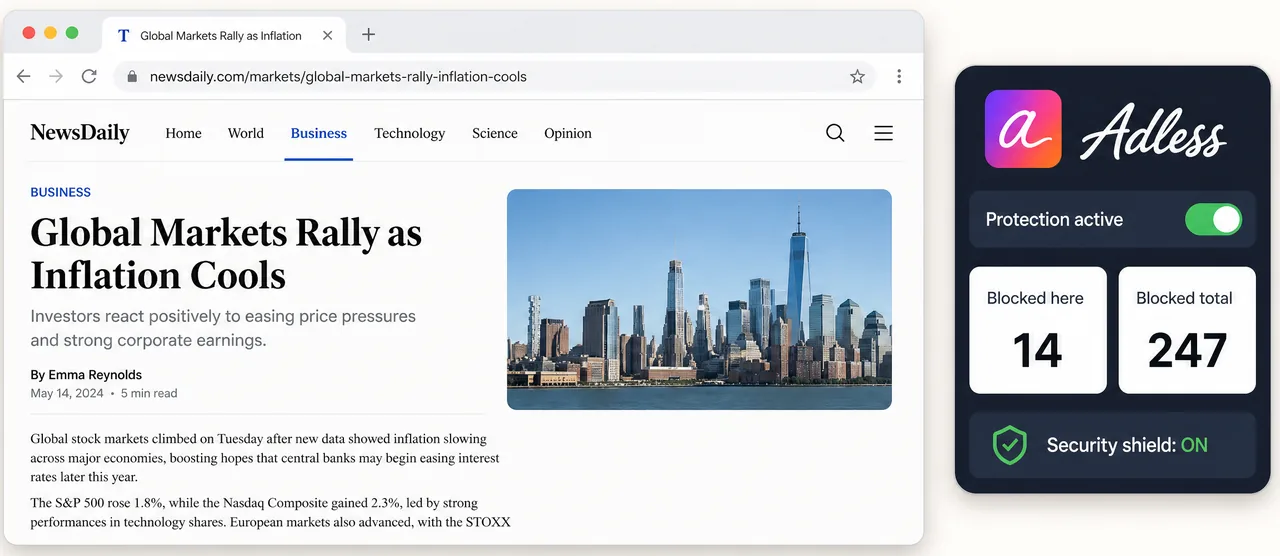
What it does for you, in plain words.
Scam websites are stopped before they open
Fake bank pages, fake parcel-delivery pages, fake "your computer has a virus" pages. Adless checks the address against a large list of known scam sites and blocks the bad ones before they load. This is in the free version.
Ads and pop-ups disappear
Pages load cleaner and faster, with nothing flashing or following you around. This part is free, forever.
"Accept cookies?" windows are answered for you
Those boxes that block every page you visit are dismissed automatically — always declining what can be declined, never accepting on your behalf.
Why this matters
Scammers work hard. Your browser should work harder.
Fraud aimed at older people is measured in billions a year. The most common tricks are a fake virus warning on the screen, or an email that looks like the bank — with a web address that is one letter off.
Adless can't answer the phone, but it can stop those look-alike pages from ever opening. The list is downloaded to the computer and the match happens there, so visiting a page sends us nothing. Addresses only ever leave the machine in a report you choose to send — our privacy policy names each one.
Blocked before it loaded.
This address matches a known phishing entry. The check ran on your device — the address wasn't sent anywhere.
matched on-device · feed refreshed every 6 hours on Pro
With Pro — the lookalike domain is caught before the page renders
The list is real, and it moves.
Scam sites are registered and abandoned daily, so a blocklist is only as good as its last refresh. The figure beside this is read from the feed itself — if we can't reach it, we show a floor rather than a number we made up.
550,000+
scam-site entries your device checks every address against — matched locally, so nothing you visit is sent anywhere.
Set up in three small steps.
No installation wizard, no settings you have to get right. If you can click a button, you can do this.
1
Click "Add to Chrome"
The button at the top of this page takes you to the official Chrome store. Click "Add extension" there.
2
That's the whole setup
Adless starts working right away. No account to create, nothing to configure.
3
Browse as usual
Pages simply look cleaner. If a scam page is blocked, you'll see a calm, clear explanation — never a scary warning.
Ninety seconds, no narrator.
Simple, honest pricing.
Ad blocking and scam-site blocking are free forever. Pro adds the on-page guards, address-level matching, faster threat updates and cookie-window handling. You can try it free for 7 days without giving a card number.
| Free | Pro | |
|---|---|---|
| Ad & tracker blocking — 28,000+ rules | ||
| Malware, crypto-miner & phishing site blocking | ||
| Anti-adblock camouflage | ||
| Tidy YouTube — layout, Shorts, rows | ||
| Per-site pause & allowlist | ||
| Threat-feed updates | Every 48h | Every 6h |
| Address-level phishing matching, checked on your device | — | |
| Security Shield guards — Credential Sentry, scare page, seed-phrase, fake checkout, paste-and-run, clipboard-swap | — | |
| Lookalike-domain warnings, checked on your device | — | |
| Cookie banners dismissed before they animate in | — | |
| FeedGuard — Facebook sponsored posts hidden | — | |
| Shield Link-Cleaner — strips utm_source, fbclid & gclid | — | |
| Price | $0, forever | $1.99/mo · $15/yr |
No card needed for the trial. Full refund within 30 days, no questions asked.
Our promise
to you
We will never show you a popup, a nag screen, or an ad of our own.
And we build no profile of you — ever. We don't ask for your name or email, nothing about the pages you visit is sent on a schedule, and the scam check happens on your own computer. That's not a blog-post promise: it's enforced by an automated check in our build pipeline, so if the code ever nags you, it won't ship. The free core stays free.
For sons, daughters and grandkids
Setting this up for a parent?
It takes one visit and about a minute. Install it on their computer and the scam-site blocking runs on its own from then on — no maintenance, no updates to click, nothing for them to manage. Turn on the 7-day Pro trial if you want the extra on-page guards too; it needs no card.
"Dad, just browse like you always do."
There is no dashboard to check and no report to read. When Adless blocks something it says so in plain words, and stays out of the way the rest of the time.
Ready when you are.
No hurry, no pressure. Install the free version today. If you like it, Pro is there when you want the extra protection.